














































How to deactivate Facebook account?
 AlthoughFacebook is not the most popular social network in Russia, the number of its users remains huge.
Many people use Facebook for personal communication, so the question «how to disable a profile on Facebook» always relevant.
Like any modern social network.
Facebook offers users a temporary «freeze» accountwith the possibility of instant recovery.
According to statistics, more than half of the users who «deleted» their profile, they restore it within a month.











We send accounts in just 5 seconds to your e-mail address!

Accounts can be downloaded in your personal account, by mail without registration or immediately after payment!

We automatically create a personal account with the history of all your orders

A long time to check the goods up to 1-24 hours ( Note for tabs )

We can find accounts of any social network and postal service, service, forum

Our accounts work steadily on most types of proxy
How to deactivate a Facebook account: step-by-step instructions.
Just log in as usual and go to your account settings.
If your profile is permanently authorized.
To deactivate your Facebook account, just follow the linkhttps://www.facebook.com/help/contact.php?show_form=delete_account,
You will only need to confirm the deactivation of your profile.
If you are using the mobile version of the official Facebook application.
All actions to temporarily freeze a Facebook account are available in the settings, in the «security» section.
Instructions for deactivating a Facebook account
For a clear examplelet's look at the process of deactivating a personal Facebook profilestep by step:
- First, you need to log in to the computer version of Facebook.
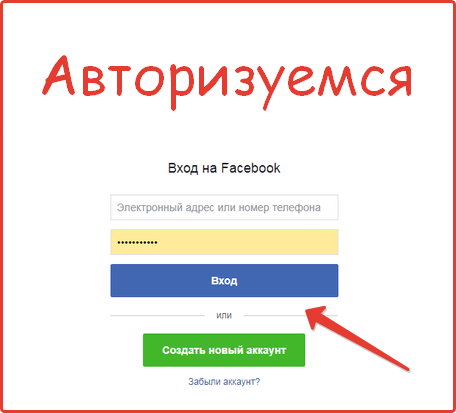
- After authorization, go to the general page settings section.
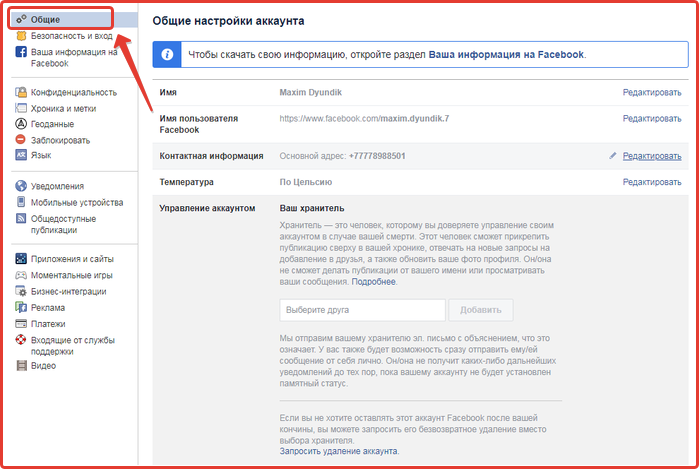
- Next, select the subsection «Account management».
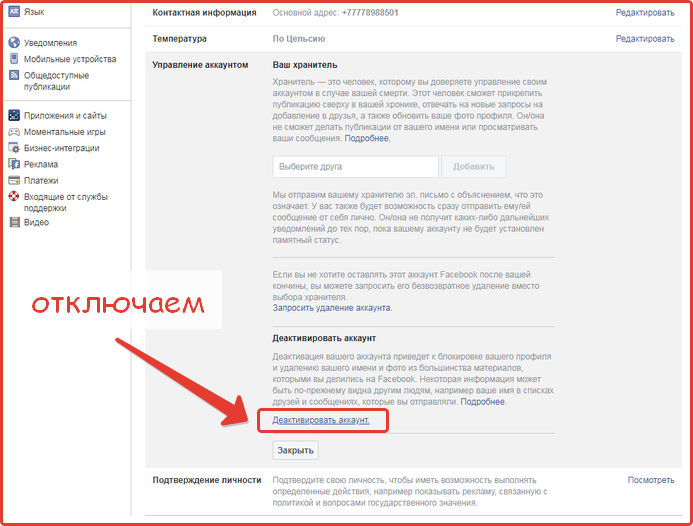
- By following the link «Deactivate account» You can temporarily block your page.
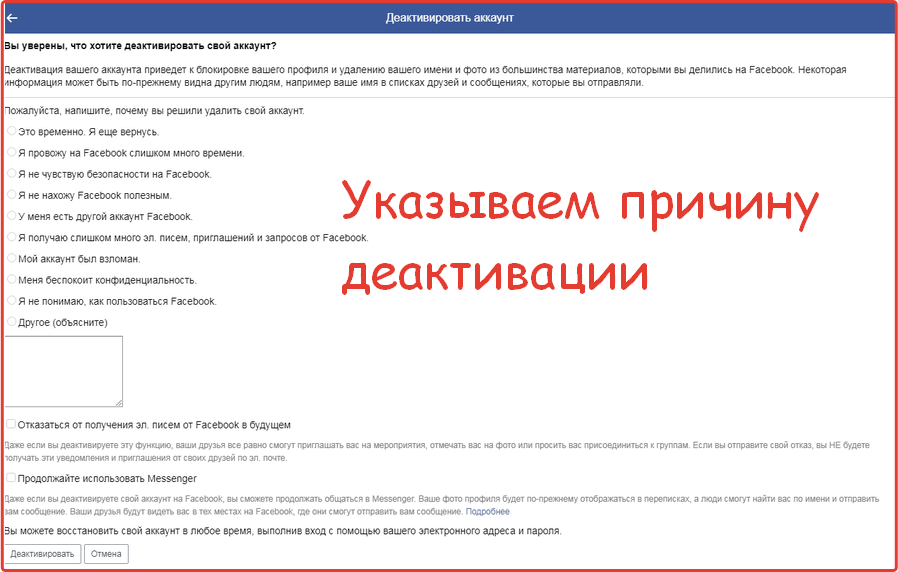
If you wish, you can specify the reason why you decided to block your page.
Note thatyou can deactivate Facebookwithout losing data and all correspondence, you can laterrestore your profile.
If you decide to completely delete your profile, then in this case you will not be able to restore all files uploaded to the profile.
If you use the page https://www.facebook.com/help/delete_account?show_form=delete_account to manage your accounts.
You have the opportunity to download all files and photos previously uploaded to Facebook.
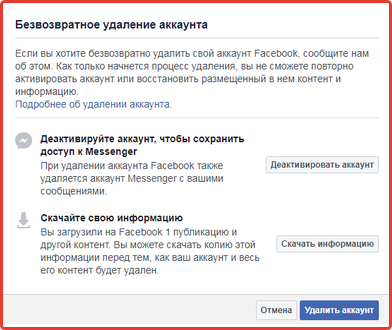
Here you can learn more about the rules for temporarily disabling a Facebook page, after reading which you will have no questions.
In most cases «cancel deactivation offacebook account» you can use exactly the same settings, you just need to go in and click the «Cancel» button.
Deactivating a Facebook account from a phone
The process of deactivating a Facebook account from a mobile device is in many ways similar to managing it through the computer version (browser).
If you are using the official Facebook application, the deactivated account will be activated after simple steps.
How to restore Facebook after deactivation?
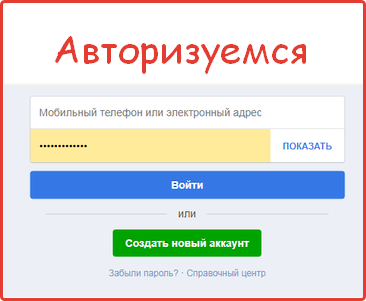
- We authenticate by entering the page login and password.
- Next, go to the profile settings section.
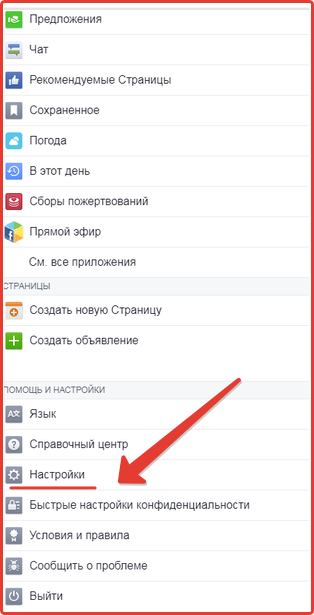
- In the section «Your information on Facebook» follow the link «account management».

- After clicking on the link, you will be asked to choose to delete the page or simply deactivate the page.

- To complete the deactivation of the page, you must select the reason for deactivating your account, after which you will completely hide your account from visitors.
If you want to deactivateFacebook accountfrom a mobile browser.
Just follow the linkhttps://m.facebook.com/help/delete_accountand instantly disable the page.
In the official Facebook mobile application, you can familiarize yourself with the rules for deactivating and deleting a profile.
Including the question «how to close a Facebook profile on a phone».
Conclusion
We recommendpurchasingFacebook accounts on our website.
All pages available for sale were obtained legally, so there is no risk of blocking.
Many users deactivate their Facebook profile from a mobile device, but we recommend using the desktop version of the site for this purpose.
You can close your Facebook profile from strangers with the function of saving data from your account.
Note that if the processof deactivating a Facebook accountis reversible, but deleting a profile occurs forever and in one direction.
On our own behalf, we recommend that in case of any problems, simply close your Facebook profile in a matter of minutes, avoiding complete deletion.
Service presentation - how to place an order!
Similar materials on this topic
On our website you canbuy accessto a special service - the ability to receiveactivation codes when registering on Facebook via IMAPas quickly and conveniently as possible. Offers in the store are constantly updated, the price is generated automatically. You will have the oppo...
more details ⟶Along with «domestic» Social media platform Facebook is very popular among Russians. In addition to the fact that this social network has a lot of useful resources with quality content,Facebook accountsare often used by users for advertising purposes. In any case, to gain...
more details ⟶If in the CIS countries «VKontakte» is the most popular among social networks, then for citizens of the Western world «Facebook» is considered the main social platform. At one time, the emergence of the social network Facebook generated enormous user interest, wh...
more details ⟶In addition to the fact that modern social networks allow people to share content with their friends and relatives, their importance in promoting goods and services via the Internet has recently increased. It is logical that the maximum effect from advertising and promotion can be achie...
more details ⟶Facebook is one of the most famous social networks today, exceeding 2 billion users per month. Such a large audience attracts many companies, projects and other sites in need of advertising. Official advertising on the social network itself costs a lot of money and not many can afford it. T...
more details ⟶Sometimes each of us faces such a problem - how to disableFacebook account. The reasons can be very different. But in most cases it happens that for some reason you want to delete the page. There can be a huge number of reasons. However, the reason may be a lack of attention among other ...
more details ⟶